Free · no login · lists stay on your device

Split your class into groups in one click

Paste your class list, choose the number of groups, and go. Balance genders, save your lists for next Monday, present full screen. Built for teachers, free forever.

My class

Tip: press Shuffle again for a fresh split — same list, new groups.

Saved lists stay on this device.
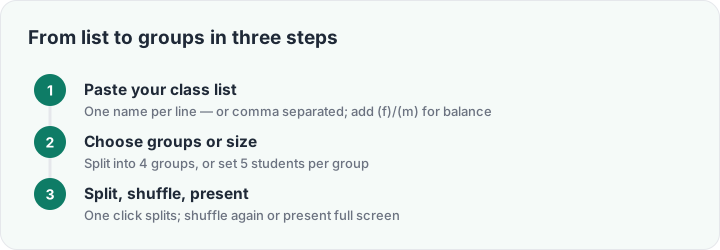
Three steps: paste list, choose groups or size, split and present
The whole flow takes under ten seconds.

Why teachers split randomly

Ask a class to form groups and the same drama plays out: friends cluster, a few students drift, and someone ends up standing alone. A random group generator ends the negotiation before it starts — the computer decided, nobody chose, and the mix is different every time. It is the fastest fair routine a teacher can own: the split takes one click, and because it is random, it carries no comment about ability, popularity or behavior.

This generator adds the two things teachers actually ask for and most tools skip. Gender balance: mark names with (f) or (m) and the split spreads them evenly across groups — no all-boys corner by accident. Saved lists: store each class once and load it in one tap all year, on this device, without an account. Your lists never leave your browser.
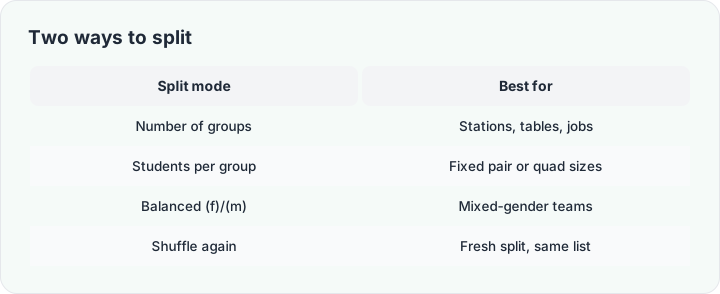
Number-of-groups vs students-per-group split modes compared
Pick by stations or by fixed group size — the engine handles both.

Built for the projector

The split lands on screen in big, readable cards. Hit Present and the groups go full screen for the projector; hit Print for a wall copy; Shuffle again when the seating plan needs a second opinion. Need named teams instead of numbers? The team generator invents team identities, and the name picker handles who answers first. For the theory behind the routines, the grouping methods guide compares five ways to split a class and when each wins.

Frequently asked questions

Is the group generator really free?

Completely — no login, no premium tier, no limit on list size. The features other tools put behind a paywall (like saving your lists) are free here.

How do I balance boys and girls across groups?

Add (f) or (m) after the names, tick "Balance (f)/(m)", and the split spreads each gender evenly across groups first.

Are my class lists stored anywhere?

No. Lists you save live in your own browser storage on this device. Nothing is uploaded to any server.

Can I split into groups of a fixed size?

Yes — switch the mode to "Per group" and set the size; the generator works out how many groups that makes.

Does it work on a phone or tablet?

Yes — the whole tool runs in any modern browser, and the groups render large enough to read from the back of the room.